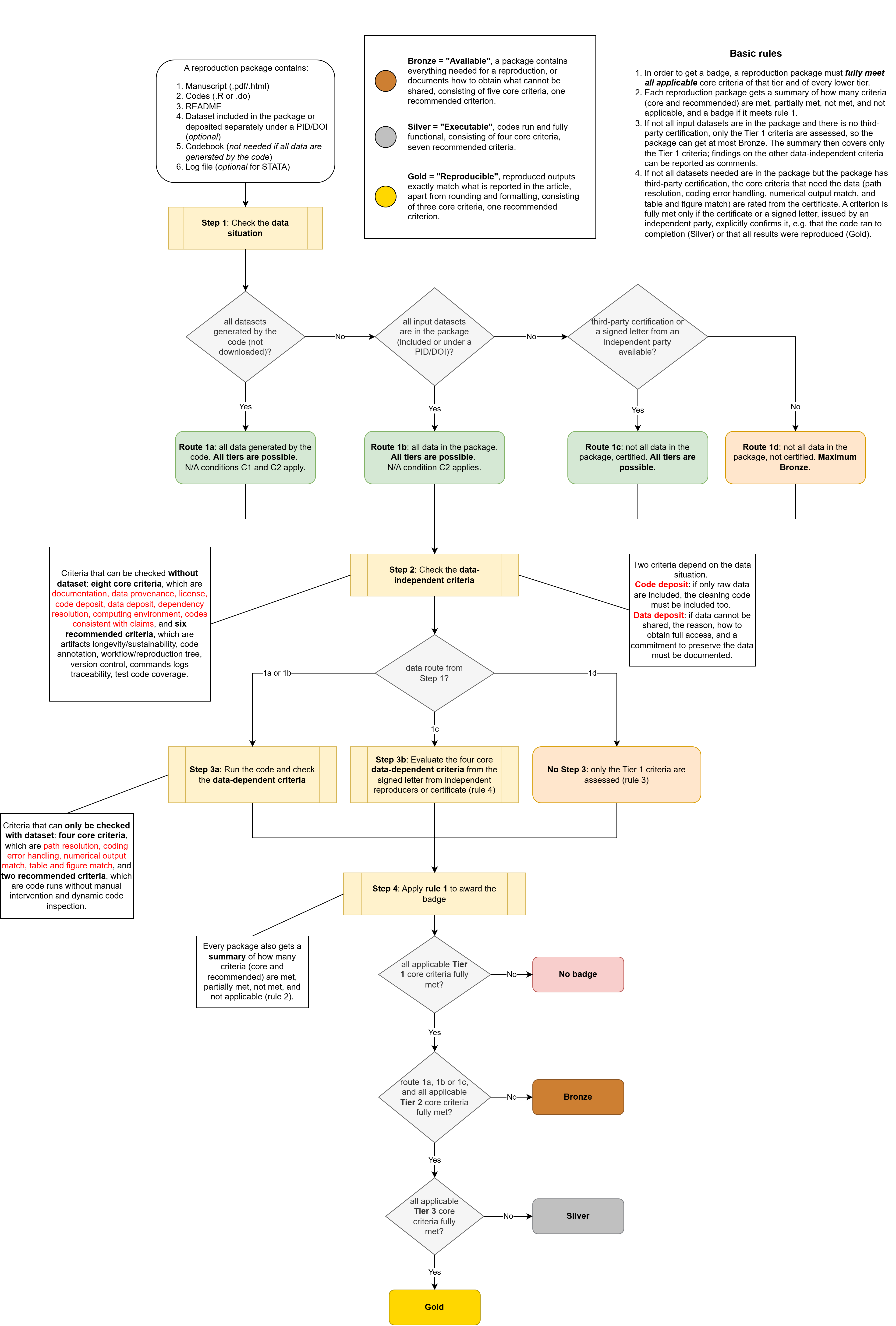
Badge pipeline
Evaluating a criterion
Every criterion page states what a package must show for the criterion to be met, partially met or not met. The note under each rating lists the sources it is based on; the #IDs link to the Sources page.
A criterion is not applicable only under the four conditions C1–C4 defined below. Anything else that is missing counts as not met.
| N/A package condition | Definition |
|---|---|
| C1 (simulation) | All data are generated by the code itself (e.g. a simulation). Data the code downloads or scrapes do not count. |
| C2 (all data in package) | All data needed are in the package (included, or deposited separately under a PID/DOI) or generated by the code. |
| C3 (no tables/figures) | The paper has no tables or figures. |
| C4 (no numerical results) | The paper reports no numerical results, only figures. |
Rules of the badge system
- In order to get a badge, a reproduction package must fully meet all applicable core criteria of that tier and of every lower tier.
- Each reproduction package gets a summary of how many criteria (core and recommended) are met, partially met, not met, and not applicable, and a badge if rule 1 is met.
- If not all input datasets are in the package and there is no third-party certification, only the Tier 1 criteria are assessed, so the package can get at most Bronze. The summary then covers only the Tier 1 criteria; findings on the other data-independent criteria can be reported as comments.
- If not all input datasets are in the package but the package has third-party certification, the data-dependent, core criteria (path resolution, coding error handling, numerical output match, and table and figure match) are rated from the certificate or the signed letter.
- A criterion is fully met only if the certificate or a signed letter, issued by an independent party, explicitly confirms it, e.g. that the code ran to completion (Silver) or that all results were reproduced (Gold).
Order of checking
A reproduction package contains the manuscript, a README, the code (R or Stata) and a codebook (not needed if all data are generated by the code), plus, optionally, the datasets (included in the package, or deposited separately under a PID/DOI) and a log file (Stata). It is checked in four steps:
- Data situation check. This sorts the package into one of four routes:
- Route 1a: all datasets are generated by the code (not downloaded). All tiers are possible, and N/A conditions C1 and C2 apply.
- Route 1b: all input datasets are in the package (included or under a PID/DOI). All tiers are possible, and N/A condition C2 applies.
- Route 1c: not all input datasets are in the package, but there is third-party certification or a signed letter from an independent party. All tiers are possible.
- Route 1d: not all input datasets are in the package, and there is no certification. The package can get at most Bronze.
- Data-independent criteria check. These can be checked without the data being in the package:
- core: documentation, data provenance, license, code deposit, data deposit, dependency resolution, computing environment, codes consistent with claims
- recommended: artifacts longevity/sustainability, code annotation, workflow/reproduction tree, version control, commands logs traceability, test code coverage
- two of these depend on the data situation. Code deposit: if only raw data are included, the cleaning code must be included too. Data deposit: if data cannot be shared, the reason, how to obtain full access, and a commitment to preserve the data must be documented.
- Data-dependent criteria check. These can only be checked with the data, so this step depends on the route:
- Step 3a (routes 1a and 1b): run the code and check the core criteria path resolution, coding error handling, numerical output match and table and figure match, and the recommended criteria code runs without manual intervention and dynamic code inspection.
- Step 3b (route 1c): evaluate the four core criteria from the signed letter from independent reproducers or the certificate (rule 4). See third-party certification.
- No Step 3 (route 1d): only the Tier 1 criteria are assessed (rule 3).
- Award the badge. Apply rule 1:
- No badge: not all applicable Tier 1 core criteria are fully met.
- Bronze: all applicable Tier 1 core criteria are fully met, but the package is on route 1d or not all applicable Tier 2 core criteria are fully met.
- Silver: all applicable Tier 1 and Tier 2 core criteria are fully met, but not all applicable Tier 3 core criteria.
- Gold: all applicable core criteria of all three tiers are fully met.
Within criteria checks (step 2 and 3), always check criteria with a lower check order first. The number counts the prerequisite steps above a criterion (0 = no prerequisite coded, — = no prerequisite links coded at all). Each criterion page lists what it builds on and what it is a prerequisite for; the Dependency graph shows all links at once.
Visual illustration of the pipeline